 Facebook
 Google
 GitHub
 Linkedin
Web Simulation: Broadening Access to Power Electronics Modeling
Browser-based simulation tools for power electronics offer advantages over traditional desktop software. Learn how this approach simplifies engineering efforts and enables easy sharing of models.
This article is published by EEPower as part of an exclusive digital content partnership with Bodo’s Power Systems.
The development of power electronics systems and devices begins with system-level simulation and rapid prototyping, making power electronics simulation tools like PLECS useful for modern workflows. Electrical engineers refine their models through multiple iterations before reaching the final design. However, sharing these models interactively outside of the development group with non-technical colleagues might be a hurdle, as it usually involves installation of necessary simulation software for every involved person. The new PLECS Web-Based Simulation 2.0 (PLECS WBS) offers a simple way of transforming an existing PLECS model into a fully functional online simulation platform accessible through any browser and on any device.

Figure 1. Example of web simulation showing identical model running on desktop and mobile devices. Image used courtesy of Bodo’s Power Systems [PDF]
Interactive Teaching Courses
Interactive power electronics simulations are more commonly an important part of complex power electronics studies. They bridge the gap between abstract theory and complex equations on one side and physical experiments on the other.
Through interactive simulations, students and researchers can manipulate simulation parameters and as shown in Figure 2, observe and interact with the resulting waveforms. This hands-on approach helps students develop an intuitive understanding of converter operations, control strategies, and system stability. For example, students can immediately see how changing duty cycle affects output voltage in the buck converter topology.
Complex transient behaviors or fault conditions that are hard to observe in a physical setup can also be simulated directly within the online course. Students can safely explore scenarios like load transients or component thermal profile without risk to equipment. Based on the design stage or test case, advanced analysis tools such as AC sweep, Impulse Response, or Multitone Analysis can be employed to characterize power electronic systems.
The lecturer can reuse existing PLECS models and create online simulations, each targeting specific course topics. This allows students to focus on core concepts rather than technicalities such as software installation and manipulation. PLECS WBS can be embedded directly into existing e-learning applications, making the experience seamless for users across different devices and platforms.
The direct engagement with power electronics development can lead to increased interest and participation in the subject matter.
Semiconductor Online Test Benches
Determining optimal parts is an important aspect of the prototyping phase in power module development. Approximating semiconductor performance, efficiency, and thermal characteristics from manufacturers’ data sheets presents a tedious challenge.
By embedding interactive simulations on their websites, manufacturers allow engineers and potential customers to explore component functionalities in real-time, improving customer experience and effectiveness. Customers can select from common topologies for different converter types (AC-DC, DC-DC, DC-AC) and customize circuit properties such as Input/Output Voltage or Rated Power according to their application. They can then place devices within the recommended operating range into individual slots on the selected topology and simulate under varying conditions based on their needs. Comprehensive simulation results, including junction temperature, efficiency, and turn-on/off losses, can help customers select optimal semiconductors.
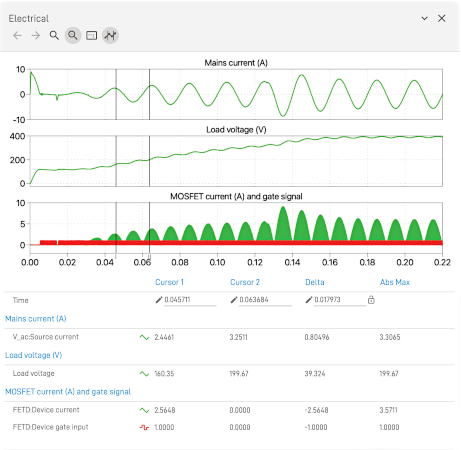
Figure 2. PLECS WBS scope. Image used courtesy of Bodo’s Power Systems [PDF]
This concept can even be expanded to mission profile testing. Because PLECS WBS uses PLECS simulation capabilities, the web simulation can be part of a broader toolchain during development, facilitating precise assessments of semiconductor performance. Manufacturers’ thermal descriptions and semiconductor model can be later used both in PLECS offline simulation or even in hardware-in-the loop real-time simulations using RT Box.
Complete Capabilities of PLECS at Your Fingertips on a Web Page
PLECS WBS operates in conjunction with a headless PLECS server. This implementation leverages the complete PLECS computational engine rather than a simplified browser alternative, preserving the advanced solver technology, comprehensive component libraries, and detailed thermal simulation capabilities that power electronics professionals require.
The architecture ensures server-side execution of computationally intensive processes while maintaining PLECS’s numerical robustness and speed. PLECS WBS users receive identical simulation results to those provided by the desktop application, with no compromise in model complexity, accuracy, or performance that would otherwise be introduced by browser-based limitations.
Simulation parameters can be presented to and set by the visitor in multiple ways, either embedded in a schematic or as a separate comprehensive table. Special focus is placed on thermal simulation, where users can upload and preview thermal description files, as shown in Figure 3. Many well-established semiconductor manufacturers already provide thermal models of their parts.
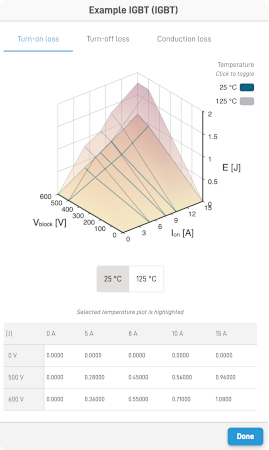
Figure 3. Turn-on losses of an example IGBT. Image used courtesy of Bodo’s Power Systems [PDF]
Simulation results can be displayed in custom-defined result tables, with out-of-range values automatically highlighted. The waveform can be observed in interactive scopes. Simulation parameters can also be exported and shared, enabling easily replicable simulations.
From a Model to a Web-Based Simulation in Just a Few Steps
Developing a complex power electronics model, such as the one shown in Figure 1, is a non-trivial task. Creating a separate copy of the model specifically for web simulation from scratch would require significant effort. Therefore, each web simulation is defined by two key components:
the PLECS Model and the WBS Design, where the WBS Design file defines the interactions between the web simulation and the actual PLECS model.
In the previous version, PLECS WBS 1.0, the WBS Design file had to be written by hand as a JSON file. This was especially demanding for complex models, where just one syntax error could result in a non-working web-based simulation. Additionally, to view and test the WBS Design, a local web server had to be installed and set up separately.
With the introduction of the Web-Based Simulation Designer in PLECS 4.9, both the design process and local testing have been streamlined and simplified. The WBS Designer offers an intuitive interface for creating WBS Designs, as shown in Figure 4., thus eliminating the need for manual writing. It is also a convenient tool to preview and test any WBS Design without requiring additional software.
The WBS Designer is launched from and communicates directly with PLECS Standalone. Any existing PLECS model can be opened, and its corresponding WBS Design can be created. The WBS Design creation process begins with the root schematic of the PLECS model, allowing the engineer to dynamically add components from the PLECS model into the WBS Design. With complete access to the PLECS model, the WBS Designer offers an easy way for seamlessly selecting scopes, schematics, and other components to incorporate into the web simulation.
Conclusion
PLECS Web-Based Simulation provides a simple and effective way to make power electronics simulations more accessible to a wider audience. Visitors can run interactive simulations anywhere without needing to install any software.
WBS Designer is available with a PLECS Standalone license. The web simulation can be evaluated in demo mode using the same PLECS Standalone license. Afterwards, the PLECS WBS license can be purchased to remove the demo limitations and unlock full functionality. Embedding PLECS WBS into any existing website is effortless, including matching the host site’s design.
PLECS WBS presents a valuable extension to your existing PLECS workflow. Learn more and try it out yourself at our website.

Figure 4. Detailed view of the WBS Designer interface with its corresponding PLECS model. Image used courtesy of Bodo’s Power Systems [PDF]
This article originally appeared in Bodo’s Power Systems [PDF] magazine.